Gaming sessions
Select High performance before launch, confirm the tray hover shows the expected label, then restore Balanced when voice chat needs lower fan noise.
Windows power plan authority
Move between Balanced, High performance, Power saver, Ultimate Performance, and custom schemes without digging through Control Panel layers every time.
Portable build, tray first workflow, optional desktop context menu integration, and trustworthy handling of export and import paths.
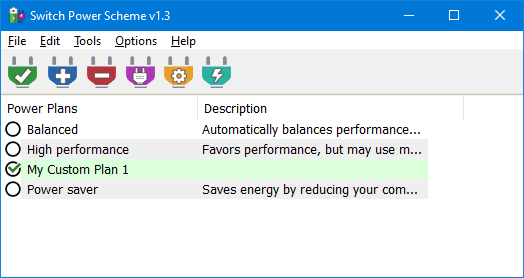
Switch Power Scheme is a compact Windows program that surfaces every active power plan in one list, then applies your choice immediately. It exists because the default path through Power Options or the Settings energy page is accurate yet slow when you change plans several times per day.
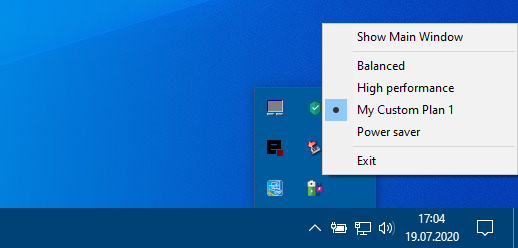
You can run the graphical window when you need deeper edits, lean on the tray icon for fast switching, or add the same list to the desktop right click menu so plans stay one gesture away. Version 1.3 also shows the active scheme when you hover the tray icon and lets you pick folders for export and import.
Each card links to the full breakdown with screenshots and operational detail.
Read every plan Windows exposes, apply with a button press or tray selection, and keep custom schemes first class.
View details
Hover the tray icon in v1.3 to read the active scheme without opening a window.
View details
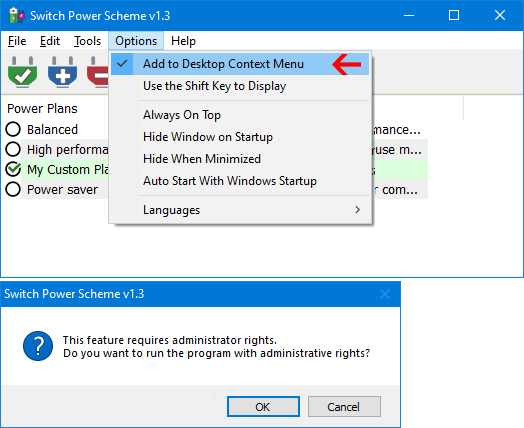
Optional Shift gated menu entries that mirror the plan list on a clean desktop surface.
View details
Select High performance before launch, confirm the tray hover shows the expected label, then restore Balanced when voice chat needs lower fan noise.
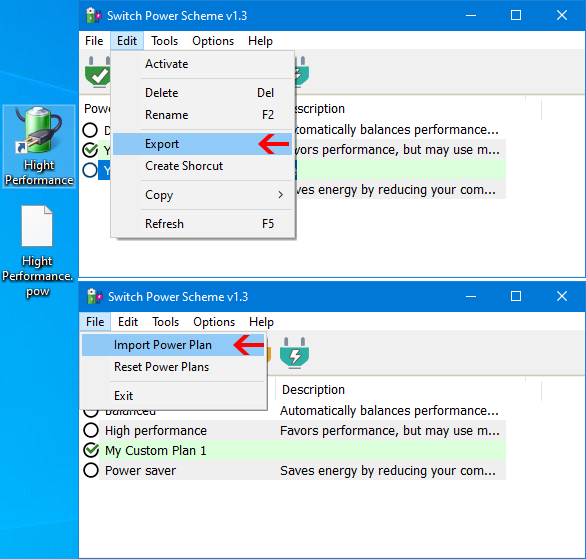
Keep the portable folder on removable media, import a baseline plan, and rename entries so onsite staff recognize the approved profile names.
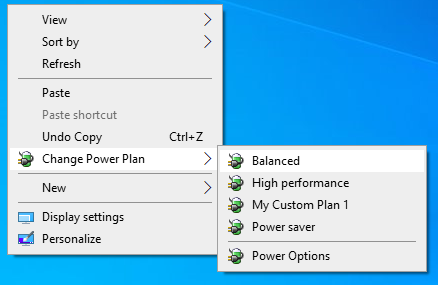
Author a custom plan that throttles processor boost on hot days, pin it to a desktop shortcut, and swap back after downloads finish.
Rough interaction cost when switching an already configured plan during a normal workday. Numbers describe typical click and navigation depth, not machine benchmarks.
| Approach | Steps to switch | Keeps focus | Portable |
|---|---|---|---|
| Switch Power Scheme tray icon | One click plus a single list selection | Stays on current workspace | Yes, folder based |
| Windows Settings energy page | Multiple navigation hops each time | Context switch into system UI | Built in only |
| powercfg shell only habit | Type or paste GUID style commands | Requires terminal memory | Scripts yes, GUI no |
| Battery flyout then Power and sleep | Moderate depth, varies by build | Interrupts flow | No |
Comparison focuses on Windows power plan switching workflows, not unrelated system monitor tools.
“Portable and friendly for anyone who swaps plans whenever battery state changes.”
“Tray integration keeps the taskbar clean while plans stay reachable.”
“Desktop context entries feel instant once the administrator step is understood.”
“Helpful when teaching family members one consistent place to click.”
“Portable and friendly for anyone who swaps plans whenever battery state changes.”
“Tray integration keeps the taskbar clean while plans stay reachable.”
“Desktop context entries feel instant once the administrator step is understood.”
“Helpful when teaching family members one consistent place to click.”
Switch Power Scheme stays compact, portable, and explicit about administrator prompts when shell integration is enabled. Integrity guidance, hash context, and antivirus nuance live on the download and trust pages so you can validate archives before execution.
No installer is required. You unzip, pick the correct binary for your architecture, and run. Context menu integration triggers a standard administrator elevation.
Adding the desktop menu uses privileged registry scope. After approval, run the action again from the elevated instance so the menu registers cleanly.