Operational playbooks
Guides and troubleshooting
Each section lists symptoms, fixes, and prevention ideas grounded in how Switch Power Scheme interacts with Windows power settings, tray registration, and desktop shell extensions.
First run checklist
- Extract the ZIP to a folder that standard users can read, such as C:\Tools\SwitchPowerScheme.
- Launch sPowers_x64.exe on 64 bit Windows or sPowers.exe on 32 bit builds.
- Confirm the window lists Balanced, High performance, Power saver, Ultimate Performance when the OS exposes them.
- Select a plan, choose Apply selected, then open Windows Settings to verify the active plan changed.
- Pin a copy to the taskbar only after you trust the folder location so relative export paths stay stable.
Tray icon issues
Symptom: icon missing after reboot
Add a Scheduled Task or Startup shortcut that points to the binary with the working directory set to the extracted folder. Windows clears manual runs when sessions end if no autostart entry exists.
Symptom: hover text does not show active plan
Confirm you are on version 1.3 or newer. Older builds lack the hover summary. If tooltips are disabled globally via group policy, re enable tooltip policies or rely on the main window readout.
Import and export workflows
Version 1.3 fixes translation errors during export and import and lets you choose the program location for those operations. Always copy exports to a controlled share so help desk staff consume the same baseline file.
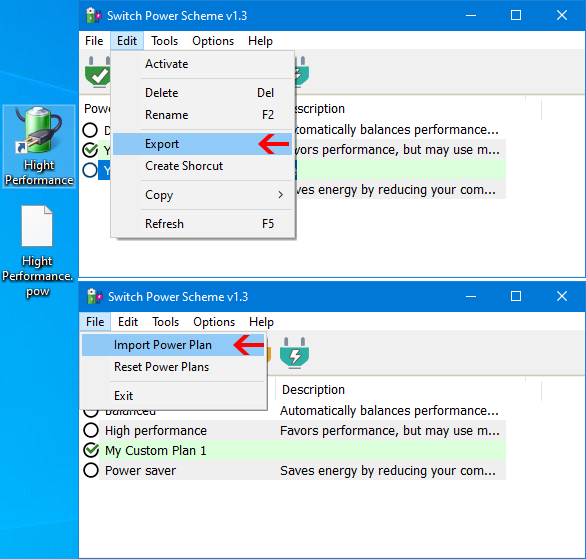
- Right click a plan in the list and choose Export, or use the Edit menu export action after selecting a row.
- Store the generated file on secured media with the hash recorded in your change ticket.
- On the target machine, choose File, Import Power Plan, then map duplicate names carefully to avoid overwriting production tuned profiles without a backup.
Antivirus warnings explained
Heuristic engines sometimes flag unsigned portable utilities. Collect the detection name, verify hashes from the download page, submit a false positive report if your enterprise vendor supports it, and temporarily quarantine only after you confirm a mismatch in hashes.
Best practices for stable power plans
- Document plan names that map to compliance tiers such as On battery saver or Docked performance.
- Pair Switch Power Scheme with Group Policy only after testing, because conflicting policy keys can revert changes silently.
- Use separate desktop shortcuts for download overnight profiles versus daily balanced profiles.
- When teaching new users, start with tray switching before introducing context menu features that require elevation.
Visual reference